【Docker】01-构建时 secret 处理
Background
最近在通过
Dockerfile构建一个镜像时,里面涉及到下载一个 git 仓库的文件,由于是私有仓库,所以需要添加 token 才能正常下载,Dockerfile如下1
2
3FROM photon:5.0
RUN wget --head="PRIVATE-TOKEN:${TOKEN}" -O a.tar.gz https://git-corp.com/a.tar.gz但是 token 作为隐私信息,不能直接写在
Dockerfile中,这样风险太高,所以研究了一下,如何安全的将密钥传入
Simple but Risk
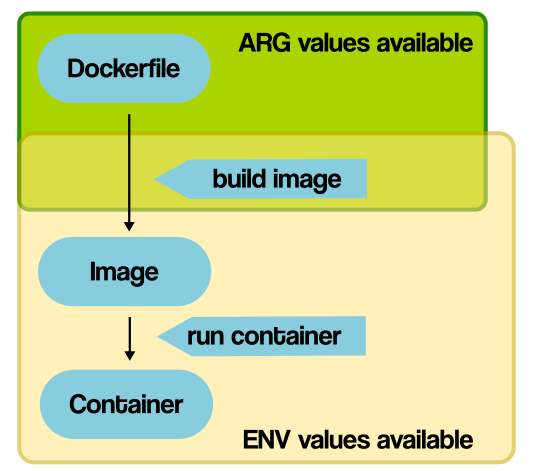
我们知道 build 过程中,Docker 提供了两种基本的变量,ENV 和 ARG,详细可见 Build variables,下面是两者主要的差异
ENV 用于在容器运行时设置环境变量
ARG 用于在构建时传递参数,运行时不可用,在
Dockerfile中可以有默认值,可以通过--build-arg动态传递参数两者都能达到传入 token 的目的,但是这两者不能很好的处理 secret,
ENV可以在容器运行时通过环境变量查看,ARG传递的参数可用通过docker history查看真实值,正如官方文档的提示,因此我们采用 docker 提供的 secrets 方式进行处理Build arguments and environment variables are inappropriate for passing secrets to your build, because they’re exposed in the final image. Instead, use secret mounts or SSH mounts, which expose secrets to your builds securely.
See Build secrets for more information.
- 理论上可以用多阶段构建 + arg 的方式实现 secret,但是构建速度会变慢
Security
Docker 为了解决构建时 secret 的安全性,通过 buildkit 提供了 --secret ,官方文档可见 Build secrets
Dockerfile修改如下,以 docker v20.10.0 为例1
2
3
4
5FROM photon:5.0
RUN --mount=type=secret,id=mytoken \
TOKEN=$(cat /run/secrets/mytoken) && \
wget --head="PRIVATE-TOKEN:${TOKEN}" -O a.tar.gz https://git-corp.com/a.tar.gz构建命令:
DOCKER_BUILDKIT=1 docker build --secret id=mytoken,src=/path/to/mytoken.txt -t sensitive:v1.0 .。src可以是文件或者环境变量(docker 20.10 支持环境变量,无须在宿主机用文件存储,在构建过程中实际还会读取文件,具体实现可见 moby/buildkit/pull/1534),内容需要替换为构建机器的真实路径,文档可见 docker/buildx:secretThe source of a secret can be either a file or an environment variable. When you use the CLI or Bake, the type can be detected automatically. You can also specify it explicitly with
type=fileortype=env.可以看到,secret 通过挂载到
/run/secrets/<id>下(默认路径,可以在Dockerfile中通过--target指定),实现了敏感信息的传递1
2RUN --mount=type=secret,id=aws,target=/root/.aws/credentials \
aws s3 cp ...
注意: docker 23.0.0 将 buildx 作为默认的 build,可见 moby/moby/releases/tag/v23.0.0,
Extension
buildkit 在 v0.8.0 正式引入
RUN --mount用于处理 secret 等挂载(即不作为实验特性,docker-ce-19.03.4 自带的版本 v0.3.1-tp-docker 表示集成了一个预发布版本的 buildx 插件,即 Tech Preview)- Builtin Dockerfile frontend defaults to
v1.2.0including support forRUN --mountamong other features. Dockerfile changelog RUN --mountsyntax for creating secret, ssh, bind, and cache mounts have been moved to mainline channel #1717
- Builtin Dockerfile frontend defaults to
docker 在 v18.06.0-ce 引入 buildkit,作为实验特性,用于增强 builder 能力
- New experimental builder backend based on BuildKit. To enable, run daemon in experimental mode and set
DOCKER_BUILDKIT=1environment variable on the docker CLI. moby/moby#37151 docker/cli#1111
- New experimental builder backend based on BuildKit. To enable, run daemon in experimental mode and set
docker 在 v19.03.0 默认安装 buildx 作为 plugin,在此之前,需要自行安装,ref
- Docker buildx. docker/docker-ce-packaging#336
1
2
3
4
5
6
7
8
9
10
11
12centos 测试 buildx
curl -o /etc/yum.repos.d/CentOS-Base.repo https://mirrors.aliyun.com/repo/Centos-7.repo
curl -o docker-ce.repo https://mirrors.aliyun.com/docker-ce/linux/centos/docker-ce.repo
yum install docker-ce-19.03.4 docker-ce-cli-19.03.4
systemctl start docker
不需要修改 /etc/docker/daemon.json (为空即可)
不需要修改 ~/.docker/config.json (为空即可)
以下命令即可查看 buildx 版本(DOCKER_CLI_EXPERIMENTAL 需要 export 到环境变量,或者以下方式启用)
DOCKER_CLI_EXPERIMENTAL=enabled docker buildx version
如果需要启用 buildkit 特性,则还需要加入 DOCKER_BUILDKIT=1,如下
展示的 commit 可以找到对应的 buildkit 版本 https://github.com/docker/buildx/commit/6db68d029599c6710a32aa7adcba8e5a344795a7
DOCKER_BUILDKIT=1 DOCKER_CLI_EXPERIMENTAL=enabled docker buildx --help
1
2
3
4
5
6
7
8
9
10
11
12
13
14# 验证 --secret
## Dockerfile
# syntax=docker/dockerfile:experimental
FROM alpine:20240807
RUN --mount=type=secret,id=mytoken \
TOKEN=$(cat /run/secrets/mytoken) && \
echo ${TOKEN} >> /root/test
## build
## 过程中 docker.io/docker/dockerfile:experimental 由于代理问题,可以配置 mirror 提前下载解决
## docker pull docker/dockerfile:experimental
## /root/a.txt 是真实存在的文件
DOCKER_BUILDKIT=1 docker build --secret id=mytoken,src=/root/a.txt -t hello:v1 .docker 在 v20.10.0 支持
--secret传入 env,并将--mount放入稳定版本,不需要开启实验特性即可使用- buildkit,dockerfile: Support for
RUN --mountoptions without needing to specify experimental dockerfile#syntaxdirective. moby/buildkit#1717 - buildkit: secrets: allow providing secrets with env moby/moby#41234 docker/cli#2656 moby/buildkit#1534
- buildkit,dockerfile: Support for
docker 在 v23.0.0 将 buildx 和 buildkit 作为默认的 builder,而 buildx 默认启用了 buildkit,可见 buildx/Getting started ,所以 docker23.0 版本及以上不需要添加
DOCKER_BUILDKIT=1