
docker-compose使用说明
Backgroud
docker-compose是为了方便启动多个容器docker-compose是1.x,docker compose是2.x,2023年6月后,1.x不再更新
install
clean up workspace
- 删除所有容器:
docker container rm $(docker container ls -aq),强制删除docker container rm -f $(docker container ls -aq) - 删除所有镜像:
docker image rm $(docker image ls -q) -a列出所有容器,-q获取id
json vs yaml
json
1
2
3
4
5
6
7
8
9
10
{
"name": "docker-compose tutorial",
"price": 123,
"is_good": true,
"tags": ["software", "devops"],
"author":{
"first_name": "hello",
"last_name": "world"
}
}yaml
1
2
3
4
5
6
7
8
9
10
name: docker-compose tutorial
price: 123
is_good: true
tags:
- software
- devops
author:
first_name: hello
last_name: worldjson解析速度比yaml快(yaml所有都视为字符串,数字需要额外处理);json通常用于数据交换,yaml通常用于配置文件
compose file
docker-compose会默认启动文件名为docker-compose.yml的文件,docker compose会默认启动compose.yaml,后者优先级较高- 使用
docker-compose启动的服务,会创建一个默认网络用于服务通信,名字通常为启动路径名_default,即docker-compose.yml在hello文件夹下,则为hello_default
1 | version: "3.8" |
compose model
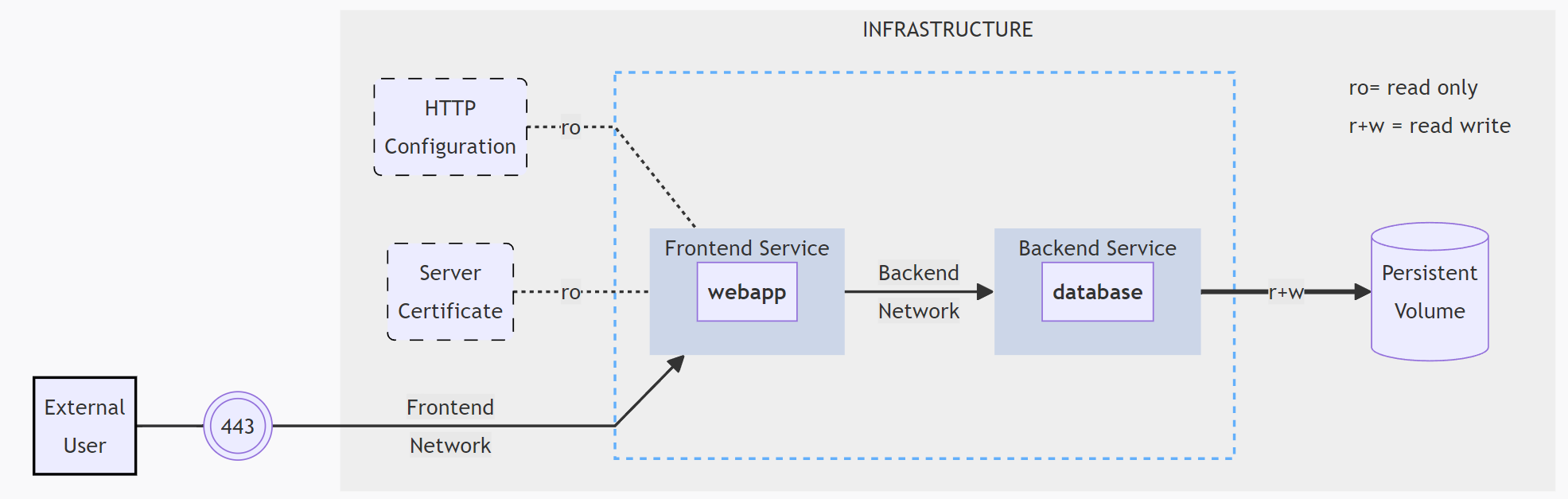
1 | # 官网示例 |
- 2 services, backed by Docker images:
webappanddatabase - 1 secret (HTTPS certificate), injected into the frontend
- 1 configuration (HTTP), injected into the frontend
- 1 persistent volume, attached to the backend
- 2 networks
参考
- Docker Compose Tutorial,B站, youtube
- compose file
本博客所有文章除特别声明外,均采用 CC BY-NC-SA 4.0 许可协议。转载请注明来自 cv-programmer!
相关推荐