
ssh使用说明
ssh连接
安装
查看是否已经安装
openssh:dpkg -l | grep openssh如果有以下内容安装成功,直接进行测试

如果没有任何输出,需要进行安装
1
2
3
4
sudo apt update # 更新软件列表
sudo apt install openssh-client # 安装SSH客户端
sudo apt install openssh-server # 安装SSH服务器
sudo systemctl start sshd # 启动
查看状态:
sudo systemctl status sshd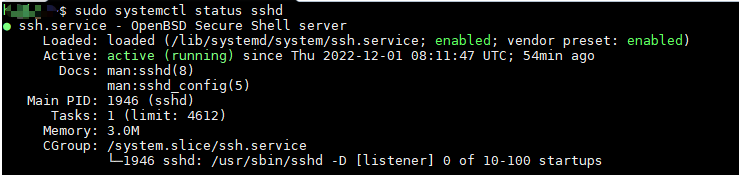
测试
- 假设A主机ip为
192.168.31.1,用户名为a,B主机ip为192.168.31.2,用户名为b - 在A主机远程连接B主机:
ssh [email protected],即可成功登录
远程桌面连接
查看是否已经安装
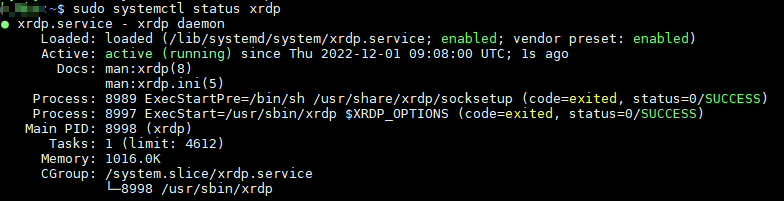
dpkg -l | grep xrdp,如未安装,则安装:sudo apt install -y xrdp,安装成功如下
查看状态:
sudo systemctl status xrdp,如未启动,则使用sudo systemctl start xrdp启动服务未启动

启动
在windows底部的搜索栏输入远程桌面连接,进行连接
免密登陆
假设A主机ip为
192.168.31.1,用户名为a,B主机ip为192.168.31.2,用户名为b,以下实现主机 A 登录主机 B 操作,如果需要双向登录,对于主机 B 需要做类似操作主机 A 执行命令:
ssh-keygen -t ed25519 -C "Host A",在~/.ssh下生成公私钥,假设为id_ed25519和id_ed25519.pub-t指定加解密算法,默认为`RSA``- ``-C`指定注释
将公钥复制到主机B中
- 方法一:
ssh-copy-id -i ~/.ssh/id_ed25519 [email protected] - 方法二: 将
~/.ssh/id_ed25519.pub中内容直接拷贝到主机B中~/.ssh/authorized_keys中
- 方法一:
在主机 A 执行
ssh [email protected],首次登录需输入yes,后续则直接免密登录如果在 步骤一 中,设置了
passphrase,则配置免密登录后,仍需要输入passphrase,可用ssh-agent简化操作,即当前终端输入一次passphrase后,后续连接无须再次输入1
2~/.bashrc 或 ~/.zshrc 中加入以下内容
alias ssha='eval $(ssh-agent) && ssh-add'
config文件(未完成)
known_hosts文件
概述
known_hosts文件存储用户访问的主机的公钥。它通过将用户的身份保存到本地系统来确保用户连接到合法的服务器。这也有助于避免中间人攻击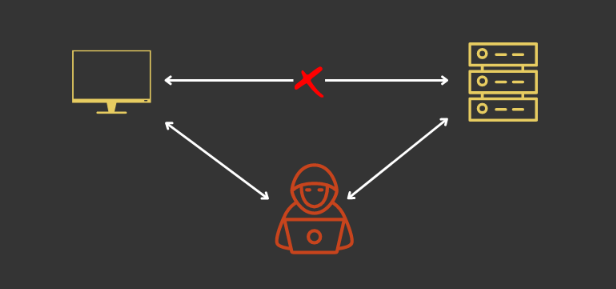
当你通过SSH连接到一个新的远程服务器时,系统会提示你是否要将远程主机添加到 known_hosts 文件,选择 yes,服务器的连接信息会保存在你的系统中
1
2
3
4The authenTIcity of host '194.195.118.85 (194.195.118.85)' can't be established.
ED25519 key fingerprint is SHA256:wF2qILJg7VbqEE4/zWmyMTSwy3ja7be1jTIg3WzmpeE.
This key is not known by any other names
Are you sure you want to conTInue connecTIng (yes/no/[fingerprint])?如果远程服务器的公钥发生了更改,你的系统会根据 known_hosts 文件中存储的信息记录此次更改,你也会收到此更改的通知
1
2
3
4
5
6
7
8
9
10
11
12
13
14
15
16@@@@@@@@@@@@@@@@@@@@@@@@@@@@@@@@@@@@@@@@@@@@
@ WARNING: POSSIBLE DNS SPOOFING DETECTED!
@@@@@@@@@@@@@@@@@@@@@@@@@@@@@@@@@@@@@@@@@@@@
The RSA host key for xyz remote host has changed,and the key for the corresponding IP address xxx.yy.xxx.yy is unknown. This could either mean that DNS SPOOFING is happening or the IP address for the host and its host key have changed at the same time.
@@@@@@@@@@@@@@@@@@@@@@@@@@@@@@@@@@@@@@@@@@@@
@ WARNING: REMOTE HOST IDENTIFICATION HAS CHANGED!
@@@@@@@@@@@@@@@@@@@@@@@@@@@@@@@@@@@@@@@@@@@@
IT IS POSSIBLE THAT SOMEONE IS DOING SOMETHING NASTY!
Someone could be eavesdropping on you right now (man-in-the-middle attack)!
It is also possible that the RSA host key has just been changed.
The fingerprint for the RSA key sent by the remote host is
69bb6ae307b441d8:9c.
Please contact your system administrator.
Add correct host key in /home/.ssh/known_hosts to get rid of this message.
Offending key in /home/.ssh/known_hosts:1
Keyboard-interactive authentication is disabled to avoid man-in-the-middle attacks.
常用命令
获取远程系统详细信息:
ssh-keygen -l -F [主机名或IP地址]删除信息:
ssh-keygen -R [主机名或IP地址],此时会生成一个known_hosts.old文件- 如远程机器重装后,公钥发送改变,用之前的ssh就会认为是中间人不安全,不能继续ssh