【Linux】docker安装
docker engine
说明
环境:
Ubuntu 20.04,uname -alsb_release -a

目前官方支持的
Ubuntu版本如下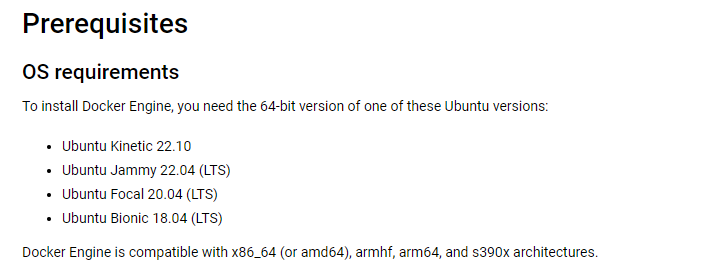
版本不一时,优先参考官网,官方安装介绍:Install Docker Engine on Ubuntu
现有
sources.list,如果速度过慢,可优先更换镜像源1
2
3
4
5
6
7
8
9
10
11
12
13
14
15
16
17
18
19
20
21
22
23
24
25
26
27
28
29
30
31
32
33
34
35
36
37
38
39
40
41
42
43
44
45
46
47
48
49# See http://help.ubuntu.com/community/UpgradeNotes for how to upgrade to
# newer versions of the distribution.
deb http://cn.archive.ubuntu.com/ubuntu focal main restricted
# deb-src http://cn.archive.ubuntu.com/ubuntu focal main restricted
## Major bug fix updates produced after the final release of the
## distribution.
deb http://cn.archive.ubuntu.com/ubuntu focal-updates main restricted
# deb-src http://cn.archive.ubuntu.com/ubuntu focal-updates main restricted
## N.B. software from this repository is ENTIRELY UNSUPPORTED by the Ubuntu
## team. Also, please note that software in universe WILL NOT receive any
## review or updates from the Ubuntu security team.
deb http://cn.archive.ubuntu.com/ubuntu focal universe
# deb-src http://cn.archive.ubuntu.com/ubuntu focal universe
deb http://cn.archive.ubuntu.com/ubuntu focal-updates universe
# deb-src http://cn.archive.ubuntu.com/ubuntu focal-updates universe
## N.B. software from this repository is ENTIRELY UNSUPPORTED by the Ubuntu
## team, and may not be under a free licence. Please satisfy yourself as to
## your rights to use the software. Also, please note that software in
## multiverse WILL NOT receive any review or updates from the Ubuntu
## security team.
deb http://cn.archive.ubuntu.com/ubuntu focal multiverse
# deb-src http://cn.archive.ubuntu.com/ubuntu focal multiverse
deb http://cn.archive.ubuntu.com/ubuntu focal-updates multiverse
# deb-src http://cn.archive.ubuntu.com/ubuntu focal-updates multiverse
## N.B. software from this repository may not have been tested as
## extensively as that contained in the main release, although it includes
## newer versions of some applications which may provide useful features.
## Also, please note that software in backports WILL NOT receive any review
## or updates from the Ubuntu security team.
deb http://cn.archive.ubuntu.com/ubuntu focal-backports main restricted universe multiverse
# deb-src http://cn.archive.ubuntu.com/ubuntu focal-backports main restricted universe multiverse
## Uncomment the following two lines to add software from Canonical's
## 'partner' repository.
## This software is not part of Ubuntu, but is offered by Canonical and the
## respective vendors as a service to Ubuntu users.
# deb http://archive.canonical.com/ubuntu focal partner
# deb-src http://archive.canonical.com/ubuntu focal partner
deb http://cn.archive.ubuntu.com/ubuntu focal-security main restricted
# deb-src http://cn.archive.ubuntu.com/ubuntu focal-security main restricted
deb http://cn.archive.ubuntu.com/ubuntu focal-security universe
# deb-src http://cn.archive.ubuntu.com/ubuntu focal-security universe
deb http://cn.archive.ubuntu.com/ubuntu focal-security multiverse
# deb-src http://cn.archive.ubuntu.com/ubuntu focal-security multiverse
步骤
卸载旧版本
- 由于是新系统,没安装过,留空
设置docker官方仓库
更新
apt包索引及允许使用HTTPS使用存储库1
2
3sudo apt-get update
sudo apt-get install ca-certificates curl gnupg lsb-release
截图展示了已经安装好的情形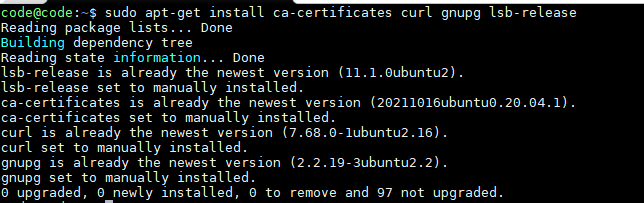
添加
docker官方秘钥1
2sudo mkdir -m 0755 -p /etc/apt/keyrings
curl -fsSL https://download.docker.com/linux/ubuntu/gpg | sudo gpg --dearmor -o /etc/apt/keyrings/docker.gpg
设置官方存储库
1
2
3echo \
"deb [arch=$(dpkg --print-architecture) signed-by=/etc/apt/keyrings/docker.gpg] https://download.docker.com/linux/ubuntu \
(lsb_release -cs) stable" | sudo tee /etc/apt/sources.list.d/docker.list > /dev/null
正式安装
再次更新
apt包索引:sudo apt-get update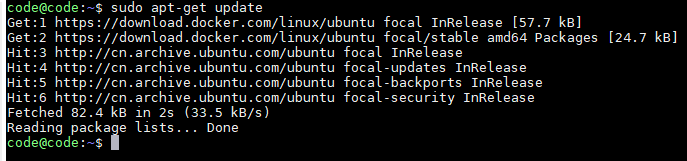
安装
Docker Engine,containerd和Docker Compose1
2最新版本命令,如安装指定版本,查看官网
sudo apt-get install docker-ce docker-ce-cli containerd.io docker-buildx-plugin docker-compose-plugin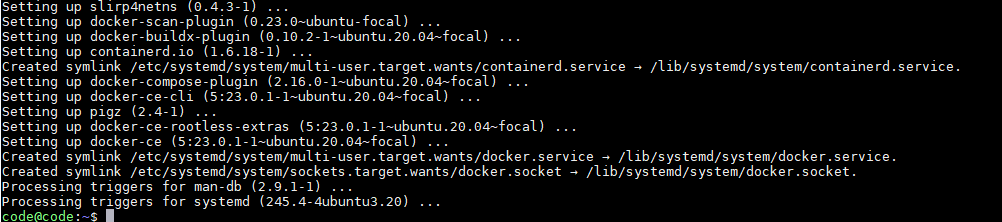
验证是否成功,使用官方
hello-world镜像验证,如果成功,输出如下1
sudo docker run hello-world
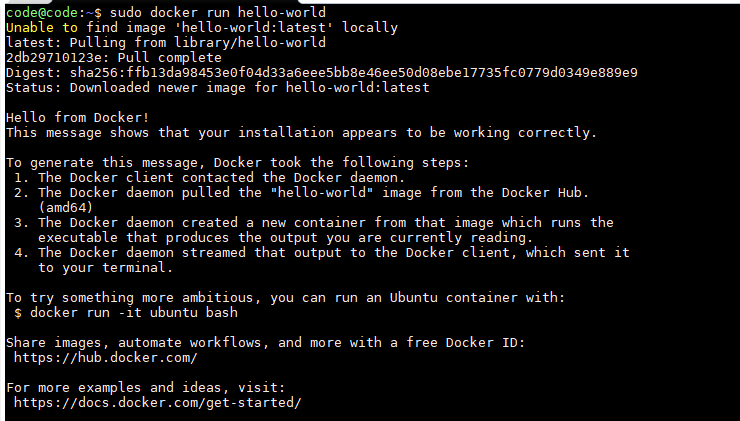
查看现有镜像
sudo docker images和查看现有容器sudo docker ps
参考
本博客所有文章除特别声明外,均采用 CC BY-NC-SA 4.0 许可协议。转载请注明来自 cv-programmer!